How to File BE Amendment on ICEGATE
Published on: Fri Dec 05 2025Satendra Mishra

How to File Bill of Entry (BE) Amendment Using Webforms on ICEGATE
Bill of Entry (BE) is among the most useful documents for importers in India. It records all the necessary data regarding imported goods, such as value, quantity, duty, and classification. Nonetheless, errors or alterations can occur, and it is necessary to get them corrected. To streamline this, ICEGATE (Indian Customs Electronic Gateway) is now giving the BE Amendment facility, which is web-form-based, and it will help importers request changes online without visiting the Customs offices.
This guide will provide a definition of BE amendment, the functionality of the ICEGATE Webform, as well as how to file your amendment step by step.
What is a Bill of Entry (BE)?
A Bill of Entry is a legal document, required under the Customs Act, 1962, of the Customs, which is submitted by importers or Customs House Agents (CHAs).
It includes:
- Importer details
- Goods classification (HSN)
- Customs duty calculation
- Value of goods
- Country of origin
- Port details
A BE application should be lodged before the clearance of imported goods. Any misinformation has to be corrected immediately so that it does not cause delays, penalties, or reassessment problems.
What is the BE Amendment Webform at ICEGATE?
BE Amendment Webform is an online service in the ICEGATE portal where importers are able to request corrections in their Bill of Entry electronically.
It allows you to correct the information that includes:
- Quantity
- Invoice value
- HSN classification
- Duty assessment
- Packages
- Importer details
- Port corrections
Example:
When an importer declares the invoice value wrongly as 9,500 in place of 9,050, then the BE must be corrected and then assessed. Through the Webform, the importer is able to make the amendment request online at any time.
How to Log in and Access the BE Amendment Webform
To enter the BE amendment module on ICEGATE, follow the following steps:
1. Go to the ICEGATE official site (service portal)
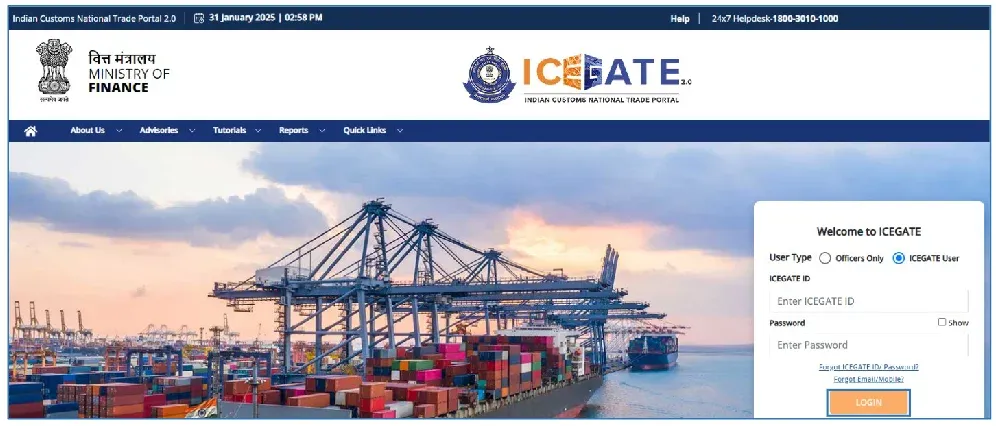
2. Click on Login
3. Enter ICEGATE ID, password, and captcha.
4. After logging in, go to:
Services → Bill of Entry → BE Amendment Webform
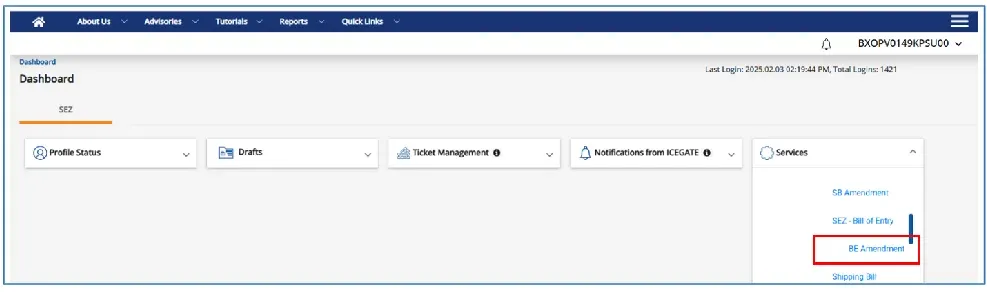
5. Enter the required details:
- Bill of Entry number
- Date of filing
- Port code
After verification, the portal shows all sections that can be corrected.
BE Amendments Types
ICEGATE helps to make a variety of amendments based on BE processing levels:
1. Before Assessment Amendment
To have corrections prior to the BE being evaluated by Customs.
2. After Assessment Amendment (Section 149).
Applied in case the BE is already assessed and requires reassessment based on:
- Wrong value
- Wrong classification
- Incorrect duty rate
- Change in quantity
3. Post–Out of Charge Amendment
To make amendments following clearance of the goods (rare cases, permitted under Section 149 with justification).
4. Self-Amendment
For minor corrections like:
- Importer address
- Invoice number
- Invoice date
- Minor clerical errors
Sections Available for Amendment
Through the Webform, importers can correct several BE components, such as:
- Importer/CHA details
- Invoice details
- Currency type & exchange rate
- Weight, quantity, or number of packages.
- HSN code/classification
- Exemption notification claim or duty rate.
- Country of origin
- Freight, insurance, and CIF information.
- Document uploads: Supporting documents.
Every amendment has to be supported by a good reason and documentary evidence.
Submitting the BE Amendment
After choosing the necessary changes, you are to perform the following actions:
1. Enter the information that needs to be corrected in the Webform.
2. Upload supporting documents, including:
- Revised invoice
- Packing list
- Certificate of origin
- Freight certificates
- Technical write-ups
3. Include a note of justification.
4. Submit the request
After submission:
- Request Number (Job ID) is created.
- The amendment is sent to the Proper Officer for checking.
- The officer can accept, decline, or seek clarification.
In case approved, BE is automatically updated in the Customs system.
Tracking the Amendment Status
To check the progress:
1. Log in to ICEGATE
2. Go to:
Services, then Bill of Entry, and then Amendment status.
3. Enter your BE number and date
Status may show:
- Submitted
- Under process
- Query raised
- Approved
- Rejected
In case a query is raised, one should respond within the portal to prevent delays.
Important Tips for Properly Submitting the BE Amendment
1. Double-check all Your Supporting Documentation before the BE filing.
2. Print the Invoice and Packing List, and the Certificate of Origin. The printed Invoice and Packing List have to match the information contained in the BE submission.
3. Fill out the Proper Supporting Document, so there is no Delay in Processing or Rejection of your Submission.
4. Provide an adequate justification for Section 149 Amendments and for Clarifying Customs Questions.
5. Respond to all Customs inquiries promptly and within the specified Time Frame.
6. Keep track of all Amendment IDs; maintain an internal copy for record-keeping.
Submitting accurate amendments saves time and will help avoid expensive reassessment or Penalties.
Exporters can now easily complete their Export GST Refund process with MYGST Refund.
MYGST Refund enables quicker processing times, no documentation errors, and all of the compliance support for Exporters is provided on India’s best automated GST Refund platform.
Begin your hassle-free GST Refund process today with MYGST Refund!
Conclusion
Correcting a Bill of Entry is now a faster, simpler, and online process with the use of ICEGATE’s BE Amendment Webform. This means that the amendment process can be done entirely online, whether it’s a clerical error or a more important reassessment under the provisions of Section 149 of the Customs Act, and keep track of any updates in real time.
Frequently Asked Questions
1. Define Amendment to Bill of Entry under Section 149 of the Customs Act?
As outlined in Section 149 of the Customs Act, amendments of BEs (Bill of Entry) can occur following an Assessment or following Clearance/Out-of-Charge of the goods, provided that valid supporting documentation exists to support your amendment.
2. What is Section 47 of the Customs Act?
Section 47 of the Customs Act allows for the Clearance of Imported Goods for Home Use only upon Payment of Duty on Imported Goods, followed by an Out-of-Charge of the Imported Goods.
3. What section is the reassessment of the Bill of Entry?
The Reassessments of the Bill of Entry are performed under Section 17(4) of the Customs Act.
4. What is the CAA 109 Amendment Act?
The CAA 109 refers to the digital approval provided by Customs for amendments requested to Bills of Entry.
Related Posts