IMS Offline Tool for GST: Download, Setup & Usage Guide 2026
Published on: Fri May 15 2026
Adv. Hetal Bansal

Bio (Reveal/Hide)
IMS Offline Tool for GST: Everything You Need to Know
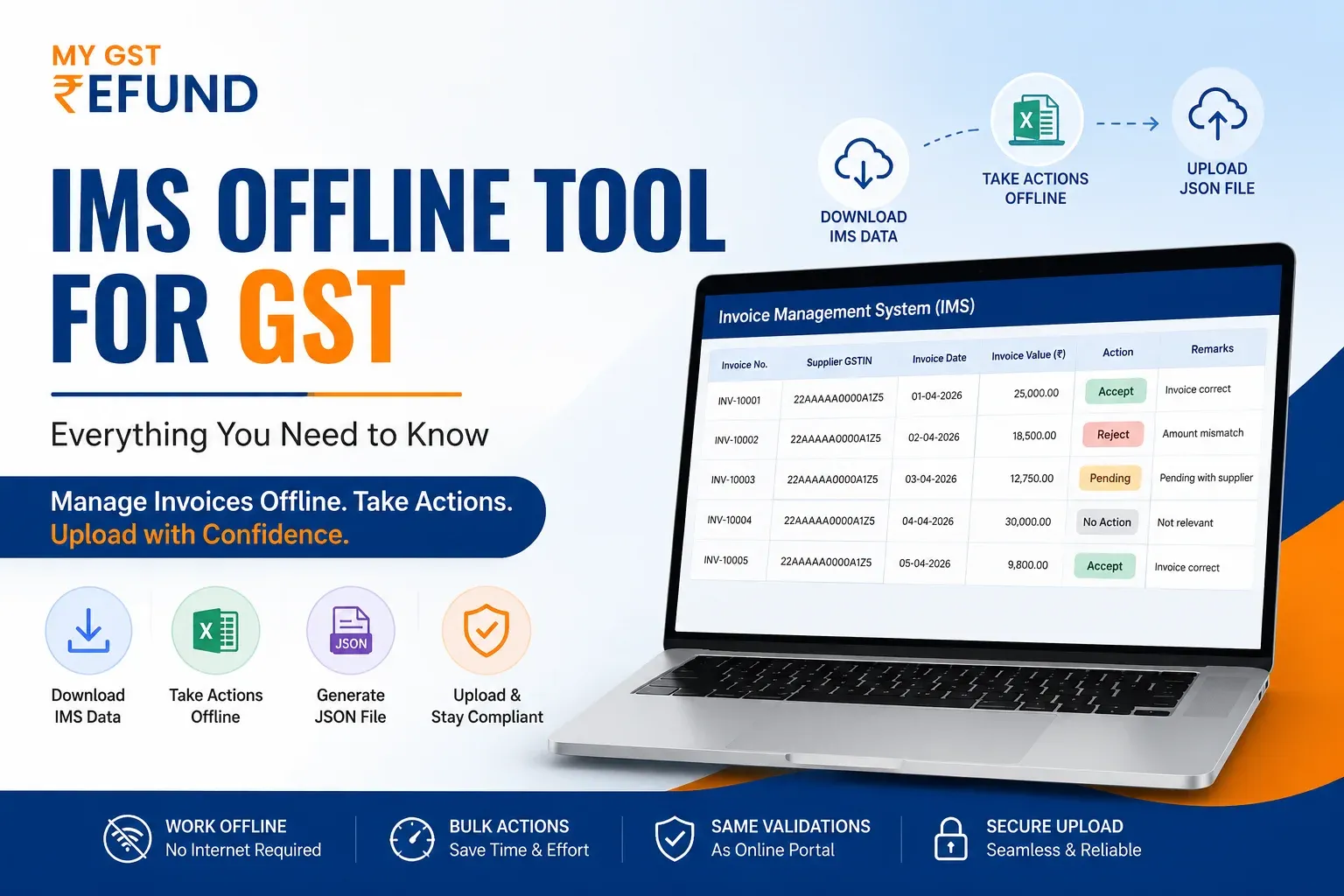
GSTN released an advisory dated 21 April 2026 stating that the IMS Offline Tool, which is an Excel-based utility, was launched to help streamline invoice operations and provide the much-needed flexibility to the GST compliance process. This paper will discuss all the information Indian taxpayers need to be aware of regarding this new tool.
Why Taxpayers Struggled With IMS on the Portal
Since its launch, IMS has given recipients the ability to accept, reject, or mark supplier invoices as pending before they flow into GSTR-2B. However, using the online portal for this came with real limitations that affected compliance efficiency.
Key Challenges Faced by Taxpayers
- Slow or unstable internet connections often disrupt invoice processing
- Processing invoices individually on the portal was not very fast and was prone to going wrong.
- No offline option meant taxpayers had to stay logged into the live portal for extended periods.
- Businesses in areas with poor connectivity faced repeated session timeouts and data loss.
- Chartered accountants managing multiple client GSTINs found the online-only workflow inefficient.
Introduction of the IMS Offline Tool
To address these problems, GSTN introduced the IMS Offline Tool on 21 April 2026. It is an Excel-based utility that allows taxpayers to download their IMS data, take
actions offline, and upload the processed file back to the portal at their convenience.
What Is the IMS Offline Tool
- An Excel-based offline utility available on the GST portal under Downloads
- Enables taxpayers to process both individual and bulk invoices without internet dependency
- Allows the same actions as the online IMS dashboard: Accept, Reject, Pending, and No Action.
- Follows the same validation rules and business logic as the online IMS portal
- Particularly beneficial for high-volume filers, CA firms, and businesses in low-connectivity areas
How to Download and Set Up the IMS Offline Tool
The IMS Offline Tool is straightforward to access and set up. To begin with, on the GST portal, follow the following steps.
Step-by-Step Download Process
- Go to the GST portal on the webpage, (GST.gov.in)
- Go to Downloads and then to the Offline Tools and click on IMS Offline Tool.
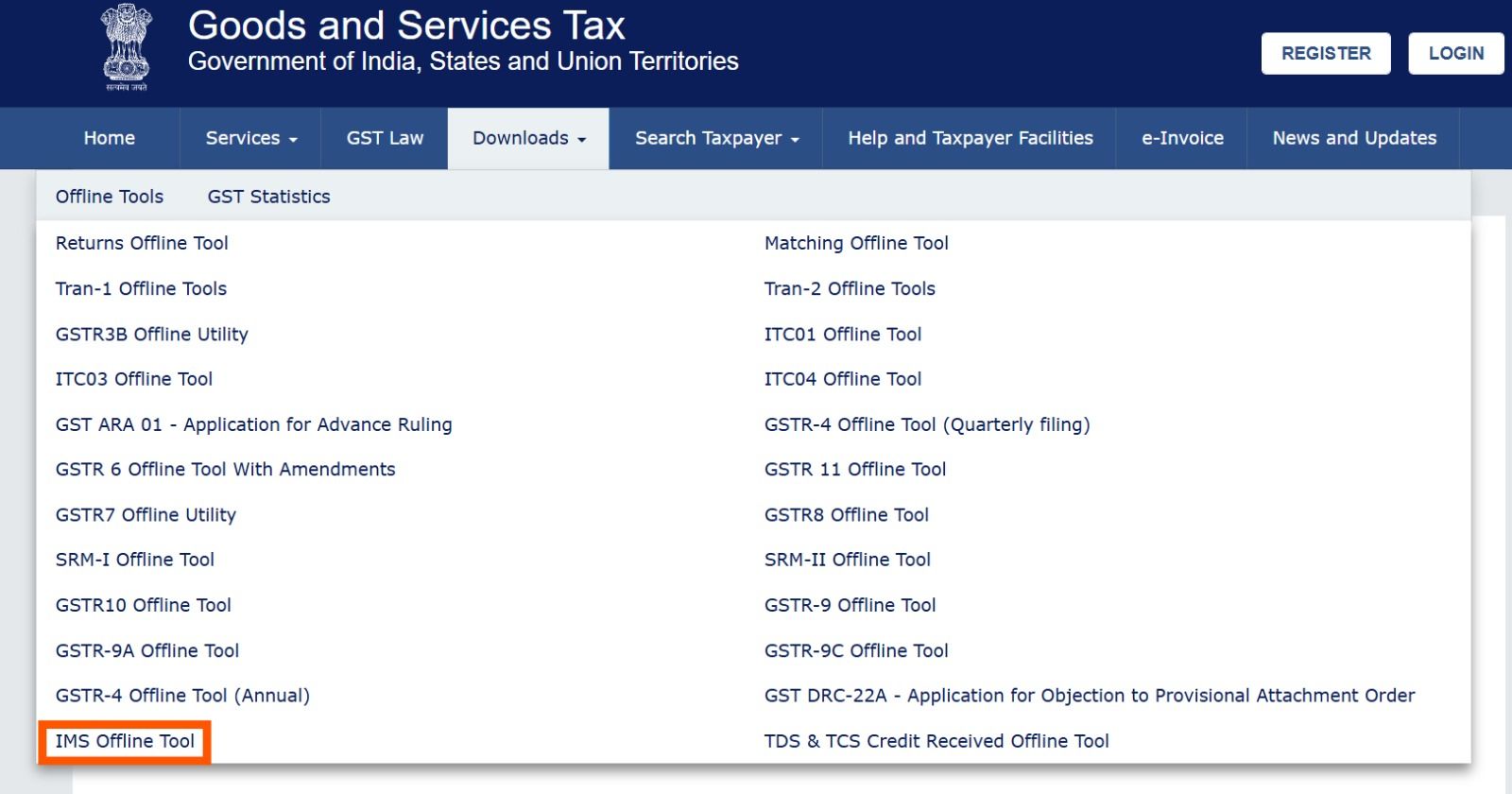
- The tool will download as a zip file
- Unzip the contents of the zip file to a folder on your system.
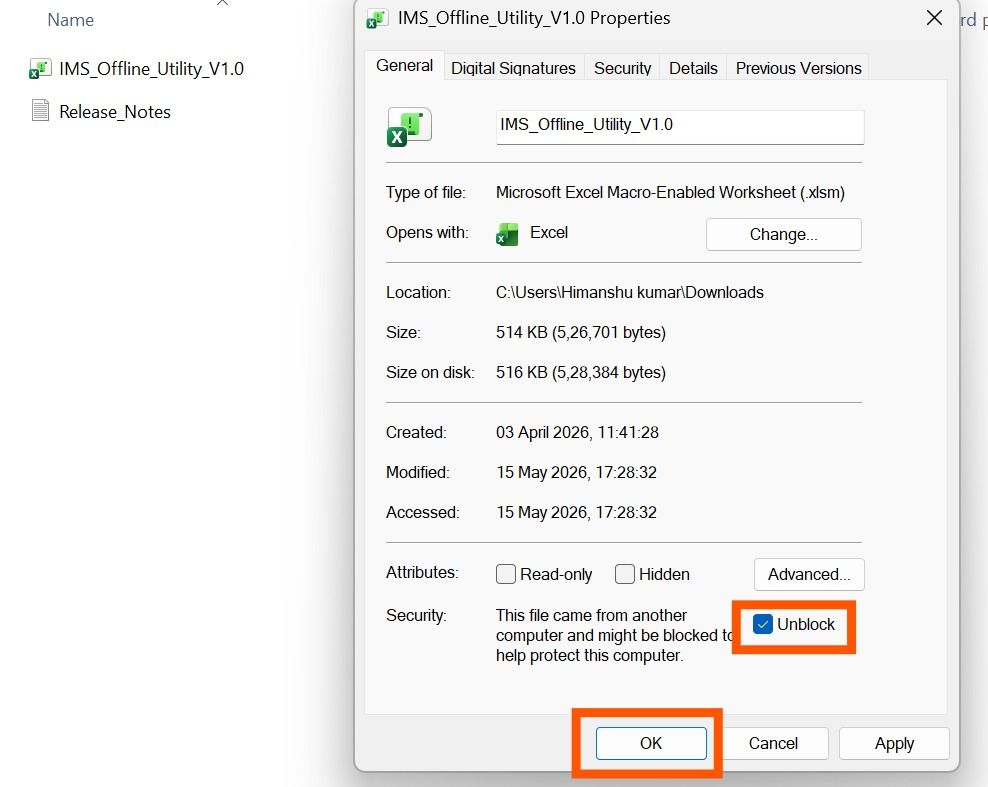
- Enable macros through the file properties before opening the Excel utility
Downloading Your IMS Data From the Portal
- Enter the GST portal and select Services, then Returns.
- Log in to the Invoice Management System (IMS) Dashboard.
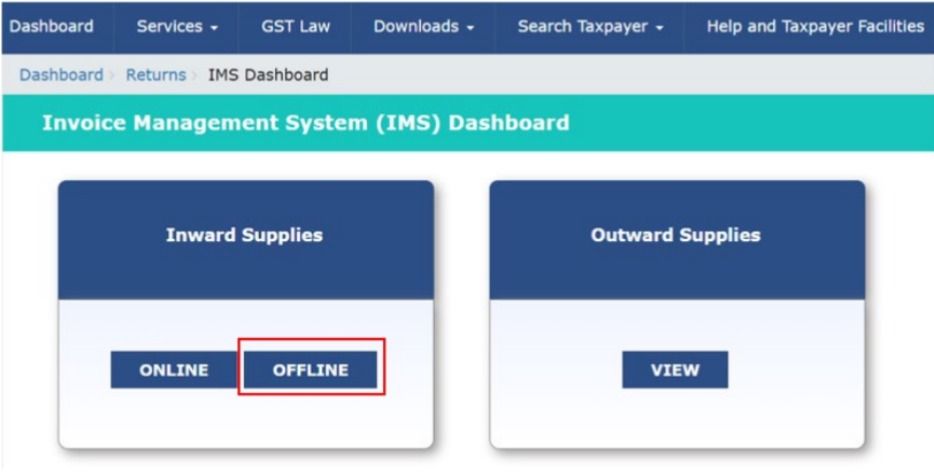
- Click on the Offline tab and select Download JSON
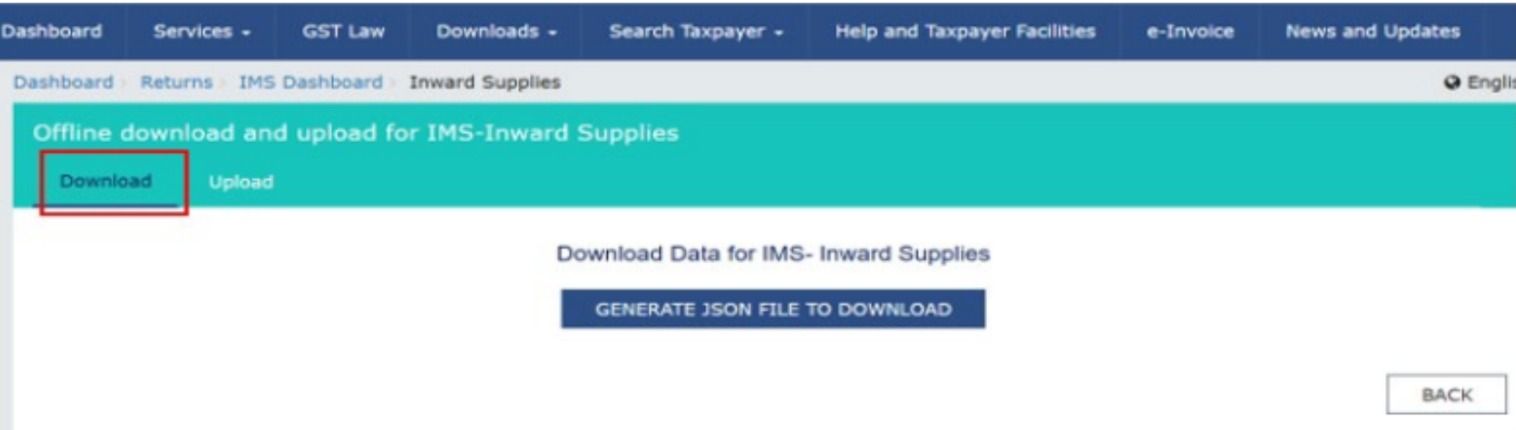
- Save the downloaded JSON file to your system for import into the tool
How to Use the IMS Offline Tool Step by Step
The workflow is composed of three steps: import, action, and upload. After the tool is configured, your IMS data is downloaded.
Stage 1: Import and Take Actions
- Open the Excel utility and click on Open Downloaded IMS JSON File in the Home sheet.
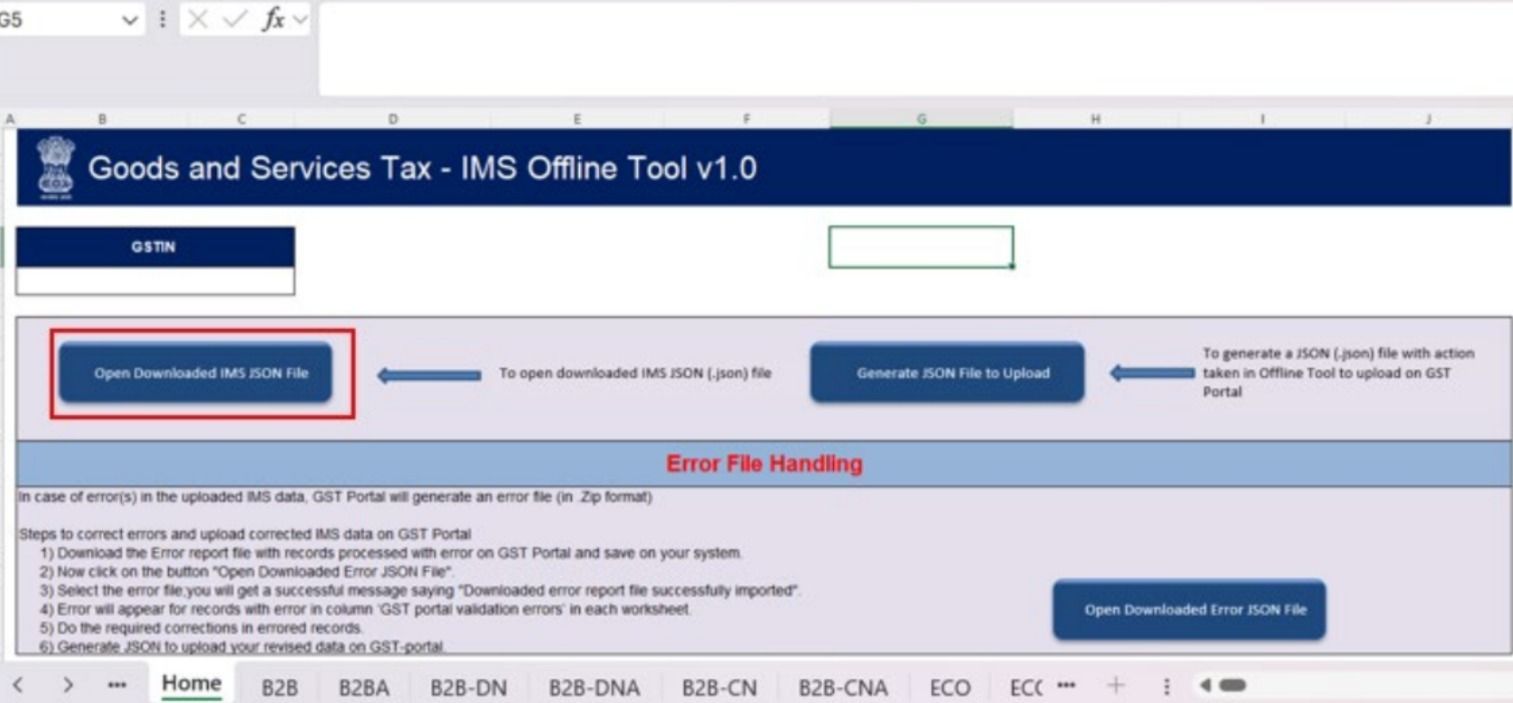
- Click on the JSON file that has been downloaded into the portal, and all the invoice data is auto-filled.
- On every invoice, you will be asked to choose an action: Accept, Reject, Pending, or No Action.
- Add remarks against any invoice where applicable.
- Filter invoices using the default filtering features to quickly sort the invoices by the parameters.
Stage 2: Validate the Sheet
- Once all actions are taken, click the Validate Sheet button
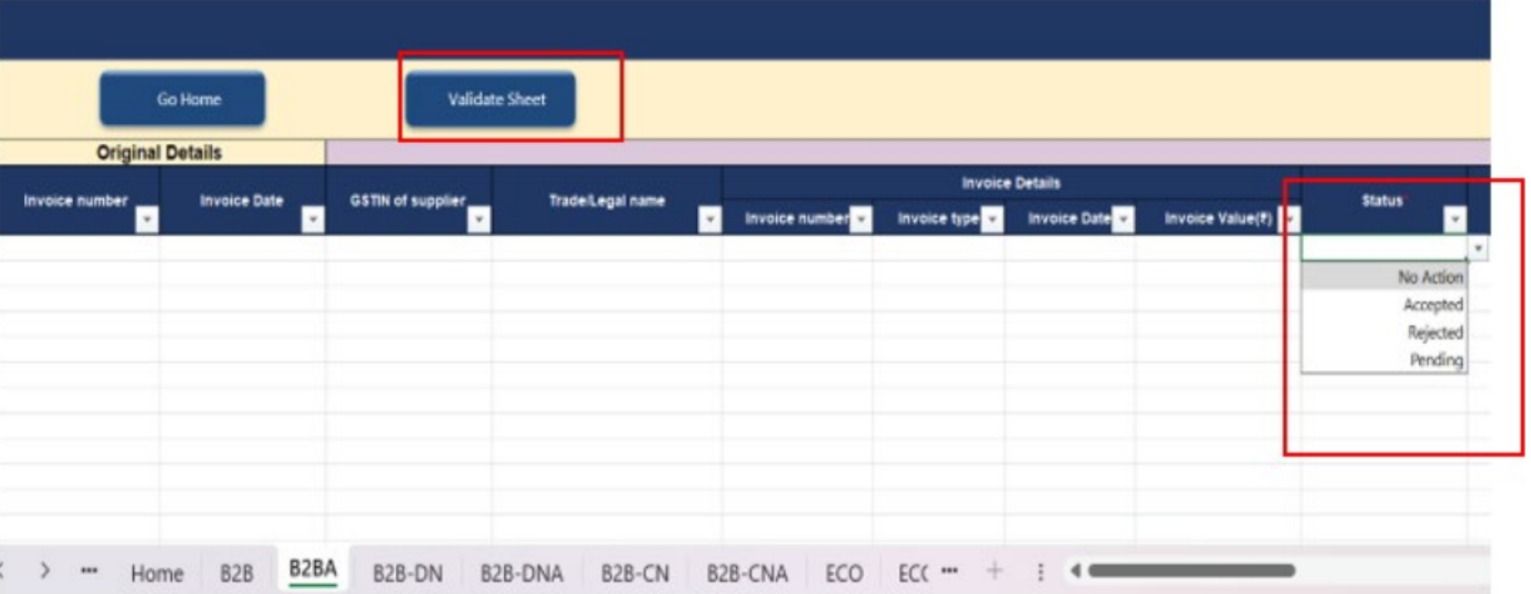
- The tool will check data across all worksheets against the same business rules as the online portal.
- Note that applying the Validate Sheet action clears all active filters
- If validation fails, an error file is generated with the status Processed with Error
- Download the error file, open it in the offline tool, fix the issues indicated, and regenerate the JSON.
Stage 3: Generate and Upload the JSON File
- After successful validation, click Generate JSON File to Upload
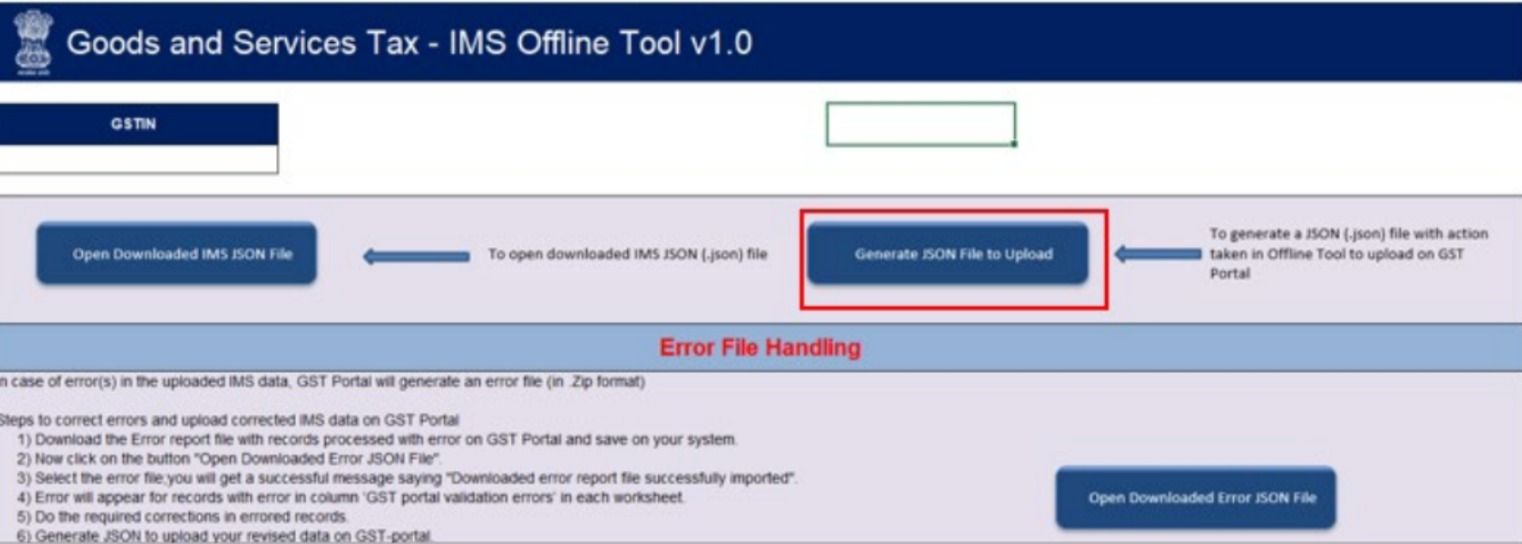
- Log in to the GST portal and navigate to Services, then Returns, then IMS Dashboard, then Offline.
- Click Upload JSON and select the generated file from your system.
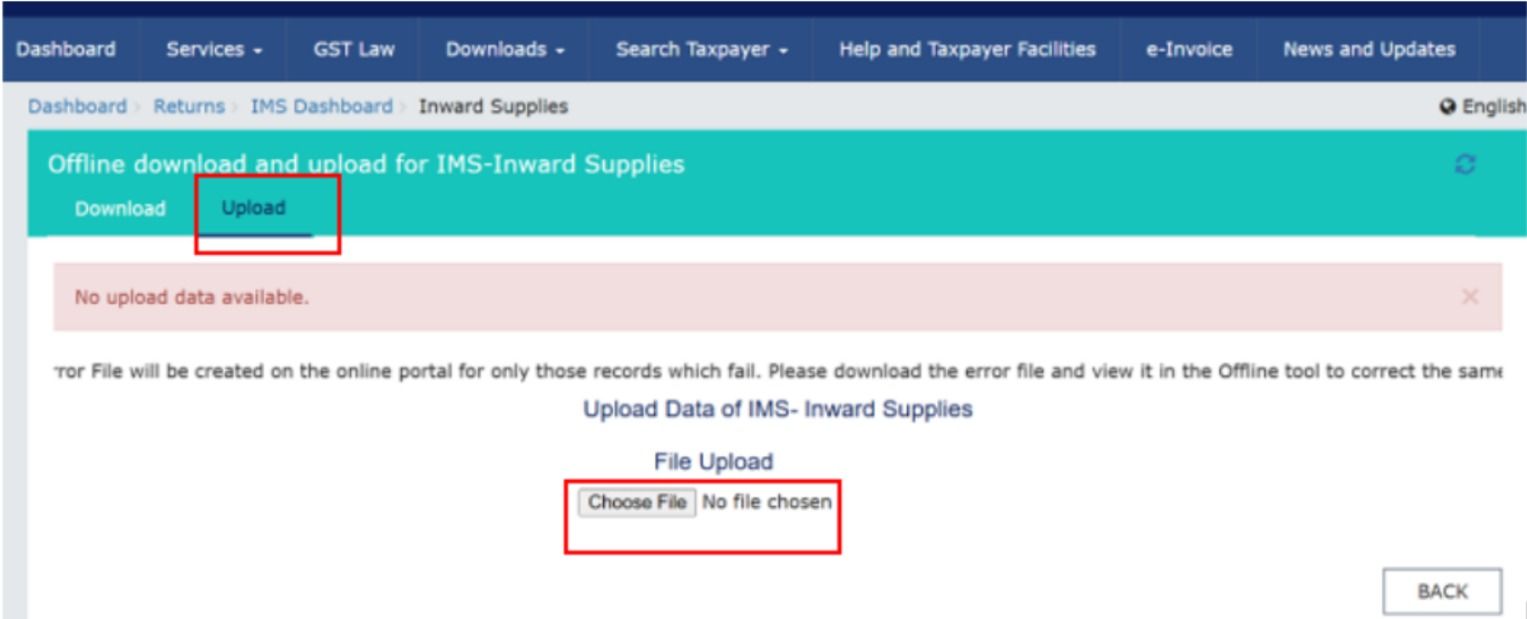
- Uploaded records are added incrementally to existing portal data
- When the same GSTIN has records, they are overridden/modified with the new upload.
Key Rules and Validations to Keep in Mind
To use the IMS Offline Tool properly, it is essential to know several significant rules according to which the data processing and uploading are carried out.
Conclusion
The introduction of the IMS Offline Tool is a significant step forward for GST compliance in India. It directly addresses the pain points of high-volume filers, businesses with connectivity challenges, and chartered accountants managing multiple clients. By moving invoice actions offline, GST Network has made the entire IMS workflow faster, more reliable, and more accessible.
For businesses looking to strengthen their GST compliance framework further, MYGSTRefund offers a comprehensive fintech platform trusted by large enterprises, corporates, and CAs across India. With features including automated GST reconciliation covering IMS versus Purchase Register, 7x faster refund processing, GSTR-1 and GSTR-3B filing, and a CFO Dashboard.
Frequently Asked Questions (FAQS)
1. Where is the offline tool in the GST portal?
The offline tool can be downloaded from the “Downloads” section on the GST portal. It allows users to prepare returns and data offline before uploading.
2. How to get IMS in the GST portal?
IMS can be accessed after logging into the GST portal under the relevant return or compliance sections. It is enabled for users based on system updates and eligibility.
3. How to fill the GST challan offline?
You can generate a challan on the GST portal, download it, and use it for offline payment through bank branches. The details must match the portal-generated challan.
4. What is the new IMS system in GST?
IMS refers to a system introduced to improve invoice matching and compliance tracking under GST. It helps taxpayers verify and reconcile input tax credit data efficiently.
5. Is it mandatory to accept IMS in GST?
Currently, IMS compliance depends on system requirements and updates by GSTN. Taxpayers are advised to follow the portal instructions to avoid mismatches or compliance issues.
Related Posts