How to track BE Transmission Status to GSTN on ICEGATE
Published on: Mon Dec 08 2025Satendra Mishra

BE Transmission Status to GSTN at ICEGATE
The Bill of Entry is the most important customs document for GST compliance when businesses import goods in India. The new BE transmission to the GSTN process ensures that every Bill of Entry is correctly sent from ICEGATE to the GST system, allowing importers to claim ITC without delays.
The GST Portal does not receive accurate BE entries due to transmission failures for many Importers. This blog explains the Bill of Entry Transmission, how to verify the BE transmission status, common BE Transmission Errors, and the importance of monitoring the BE Transmission Status to ensure a seamless GST ITC Claim.
What is BE Transmission to GSTN?
BE transmission is defined as the digital transmission (or synchronizing) of Bill of Entry data by the ICEGATE customs server to the GST Network (GSTN).
After being transmitted successfully, the importer can view:
- IGST amount in GSTR-2A / GSTR-2B
- Duty Payment Details
- Valid ITC Eligibility
What Data is Transmitted?
- BE Number
- IGST Paid
- GSTIN of the Importer
- Port of Import
- Date of Filing
- Duty Challan Details
- Importer Details
After the BE assessment, transmission typically occurs automatically. However, there are instances when it fails due to technical errors, data entry errors, or validation errors. Try our CFO/Business Dashbaord to track and void errors.
Newly Enabled BE Transmission Status Feature at ICEGATE
ICEGATE has recently introduced a special online option that allows users to check the BE status of transmission with a single click.
The Major Highlights of the New Feature.
- No login required
- Works for all BE types
- Instant status check
- Shows reason for failureHelps importers take instant and fast actions.
- 100 per cent connected to GSTN validation systems.
What Information Can You See?
- Status of Transmission (Success / Failed / Pending)
- Date & Time of Transmission
- Code of the Error and the description of the error.
- GSTN Response
- Next Steps for Correction
This is a very helpful feature for the importers who face problems with missing import ITC in GSTR-2B.
Step-by-step Procedure to Verify the BE Transmission.
To monitor your status on the transmission of the Bill of Entry on ICEGATE, follow this simple process:
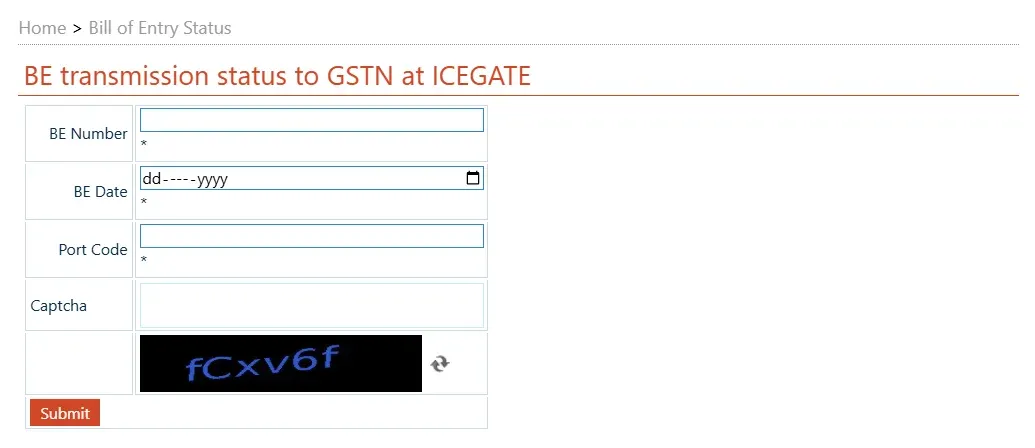
Step 1: Visit the ICEGATE BE Status Page.
To define: Search BE transmission status ICEGATE, or just go to the official ICEGATE enquiry page.
Step 2: Enter the details of the Bill of Entry.
You will need:
- BE Number
- BE Date
- Port Code
- GSTIN
- Captcha
Step 3: Submit the Form
Click Search / Submit.
Step 4: Monitor Transmission.
One of these statuses will be:
Step 5: Take Action
In case BE is successfully transmitted, wait for auto-population of GSTR-2B.
In case of failure, fix the particular problem (GSTIN mismatch, error in duty payment, and so on) and request re-transmission.
Common Reasons for BE Not Transmitting to GSTN
Partial transmission of BE is frequent, which usually results in missing ITC in GSTR-2B. The most common causes are the following:
1. GSTIN Mismatch
The insertion of a wrong or inactive GSTIN in BE will prevent transmission.
2. Incorrect Importer Details
Validation errors could result from a name mismatch or incorrect PAN.
3. BE Not Finalised
In case the BE assessment or duty payment is pending, they cannot be transmitted.
4. GSTN Server Issues
GSTN could fail to get data during high load.
5. The Invalid Port or BE Number Format
Wrong format, wrongly placed or omitted zeros, or wrong digits halt transmission.
6. Duty Payment Issues
Errors in the IGST challan or non-payment, and mismatched CIN.
7. Technical Failure at ICEGATE
Uncommon, but may occur during the maintenance of the backend.
Pro Tip:
In case your BE is not shown in GSTR-2B, first ensure that you check the BE Transmission Status.
The Advantages of Checking the BE Transmission Status.
Regular checking of the BE transmission status has several benefits:
Prevents Loss of Import ITC : Before the generation of GSTR-2B, you can act.
Minimizes GST Compliance Errors : Correcting the mismatch at an early stage ensures that monthly returns are properly filed.
Ensures Quick Refunds: In the case of exporters, an IGST refund cannot be made if the BE data is not sent.
Assists in correcting Data Entry mistakes: The errors in GSTIN, PAN, and BE can be rectified before the month-end.
Conclusion
The BE Transmission Status option at ICEGATE provides an easy and convenient means through which an importer can see that their Bill of Entry information has been received by GSTN. This guarantees quick and correct ITC claims, lessens risks in compliance, and prevents delays in import processing.
For businesses that rely on import ITC, constant monitoring of the BE transmission status is necessary. This means that with the transmission of BE data, the GST filing will be smooth, cash flow will be better, and there will be no errors in compliance.
Frequently Asked Questions (FAQs)
1. When invoices are not sent to ICEGATE, what does that mean?
This is an indicator that your BE or import invoice data has not been transferred from ICEGATE to GSTN. This can cause your import IGST to not show in either GSTR-2A or 2B, preventing ITC claims until the issue is corrected.
2. What is the procedure for verifying BOE in the GST Portal?
Log in to the GST Portal → Services→ Returns →GST-2A / 2B→ Import of Goods.
Related Posts