How to Check IGST Scroll Status on ICEGATE: A Guide
Published on: Thu Jul 09 2026
Adv. Hetal Bansal

Bio (Reveal/Hide)
How to Check IGST Scroll Status on ICEGATE (Step-by-Step Guide)
Wondering why your IGST refund has not been credited even after months of export? The IGST Scroll Status on ICEGATE is the answer most exporters miss checking. This status confirms whether customs has processed your refund internally before it reaches your bank account.
Delays here happen due to mismatched Shipping Bill Status, EGM Status not filed, or bank validation errors. This guide explains what scroll status means, and how to check IGST scroll status enquiry online, and how to fix common delays step by step.
What Is IGST Scroll Status?
IGST scroll status shows the stage of your refund inside the customs system after your Shipping Bill Status and EGM Status are validated by ICEGATE.
Understanding IGST Scroll Status on ICEGATE
The scroll is a customs-generated list that authorises IGST refund payment for exported goods.
- It is created only after the Bill of Entry or Shipping Bill data matches the GST returns
- Each scroll carries a unique IGST scroll number for tracking
- Scroll generation confirms customs has approved the refund internally
Why does IGST Scroll Status Matter for Exporters?
Exporters rely on the scroll status to know if their refund is stuck at the customs stage or the bank stage.
- Confirms refund approval before actual credit
- Helps identify if the issue is with GSTN or customs
- Useful for follow-up with customs officers with exact reference numbers
As per the latest 2026 updates on ICEGATE, customs has increased the frequency of scroll runs at major ports. This means checking the status weekly gives exporters a clearer picture of the IGST Refund Status.
Difference Between IGST Refund Status and IGST Scroll Status
IGST Refund Status shows the processing stage of the export IGST refund claim. But IGST Scroll Status shows whether the approved IGST refund has been processed for payment by the Indian Customs EDI System (ICES).
How to Check IGST Scroll Status Online?
Checking scroll status regularly helps exporters catch errors early before refund delays become long-term issues.
Step 1: Log in to the ICEGATE Portal (https://www.icegate.gov.in/ )
Visit the ICEGATE portal and sign in using your registered IEC credentials (User ID and Password).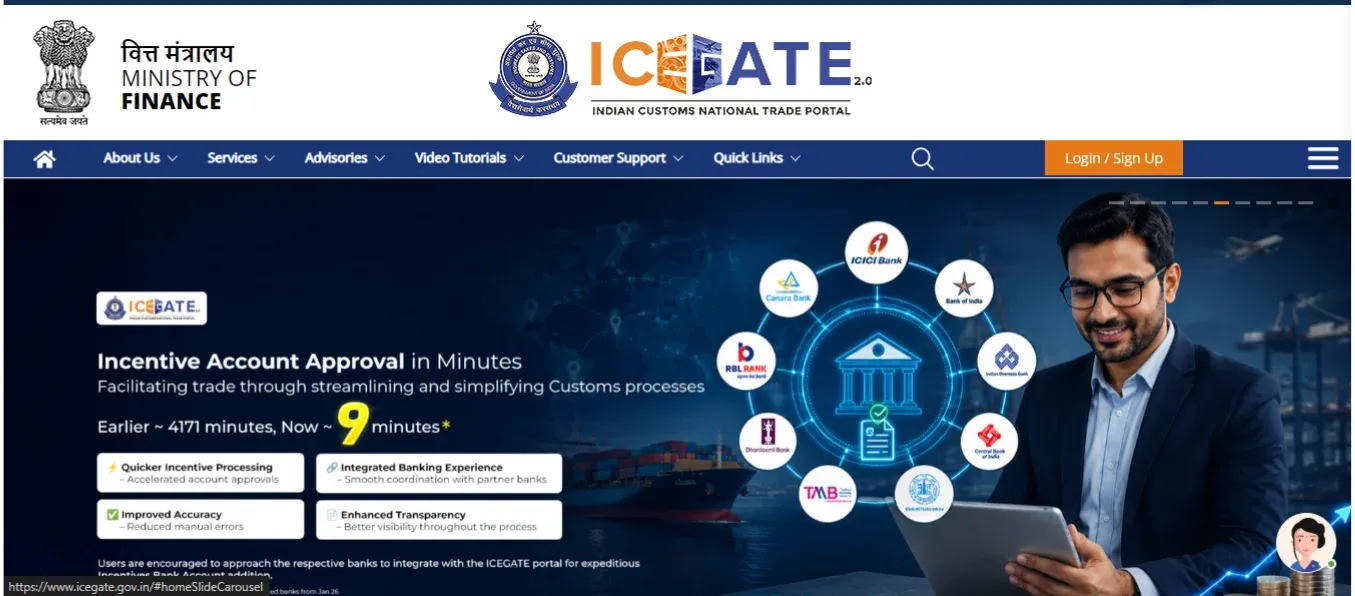
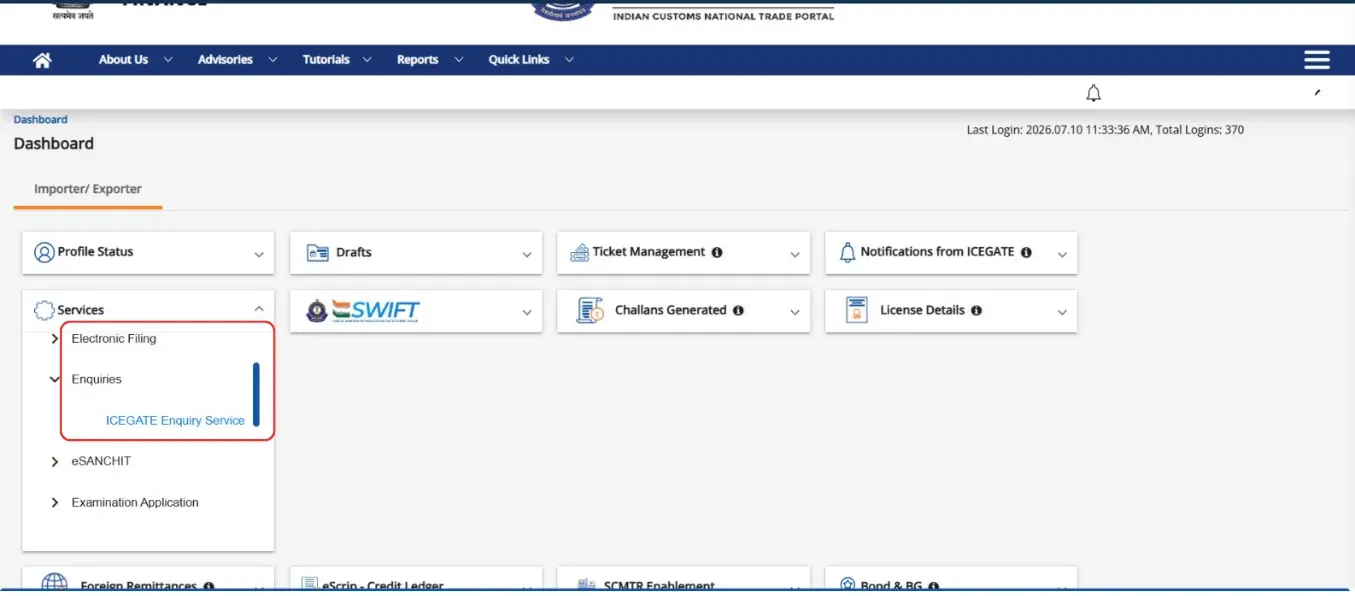
Step 2: Open the Dashboard
After logging in, you will be redirected to the Importer/Exporter Dashboard.
From the left-hand navigation panel, locate the Services section.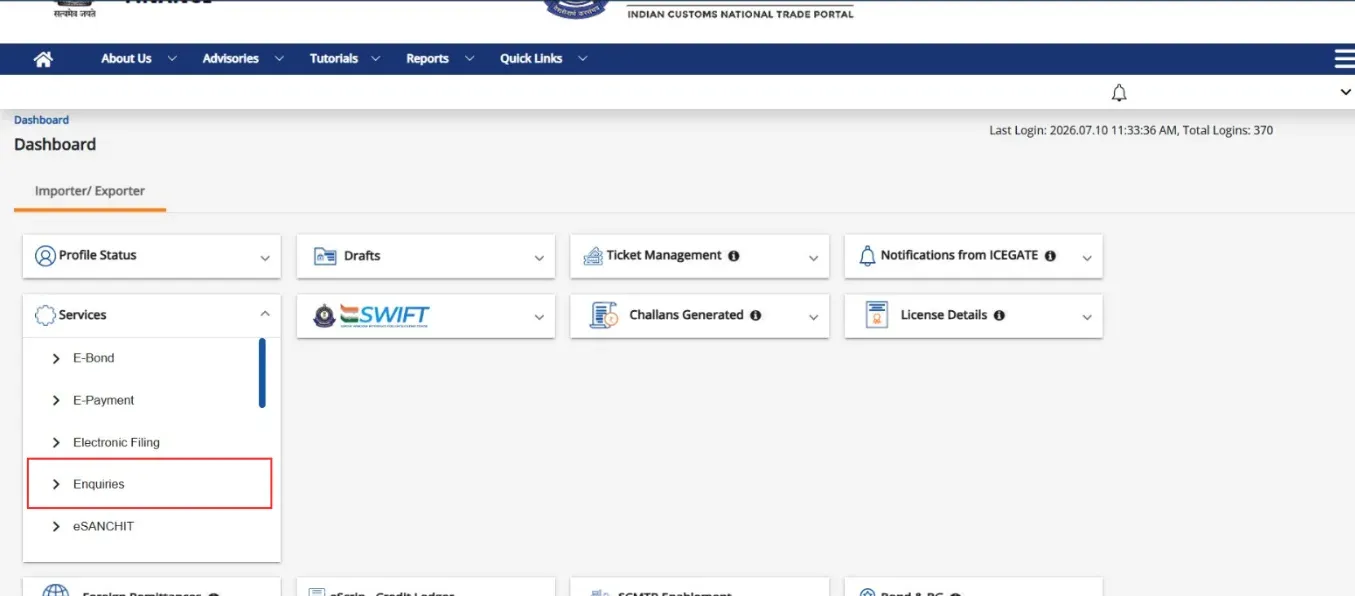
Step 3: Navigate to the Enquiries section
In the Enquiries section, then Services, click on Enquiries.
Then Click ICEGATE Enquiry Service.
Navigation To:
Dashboard → Services → Enquiries → ICEGATE Enquiry Service
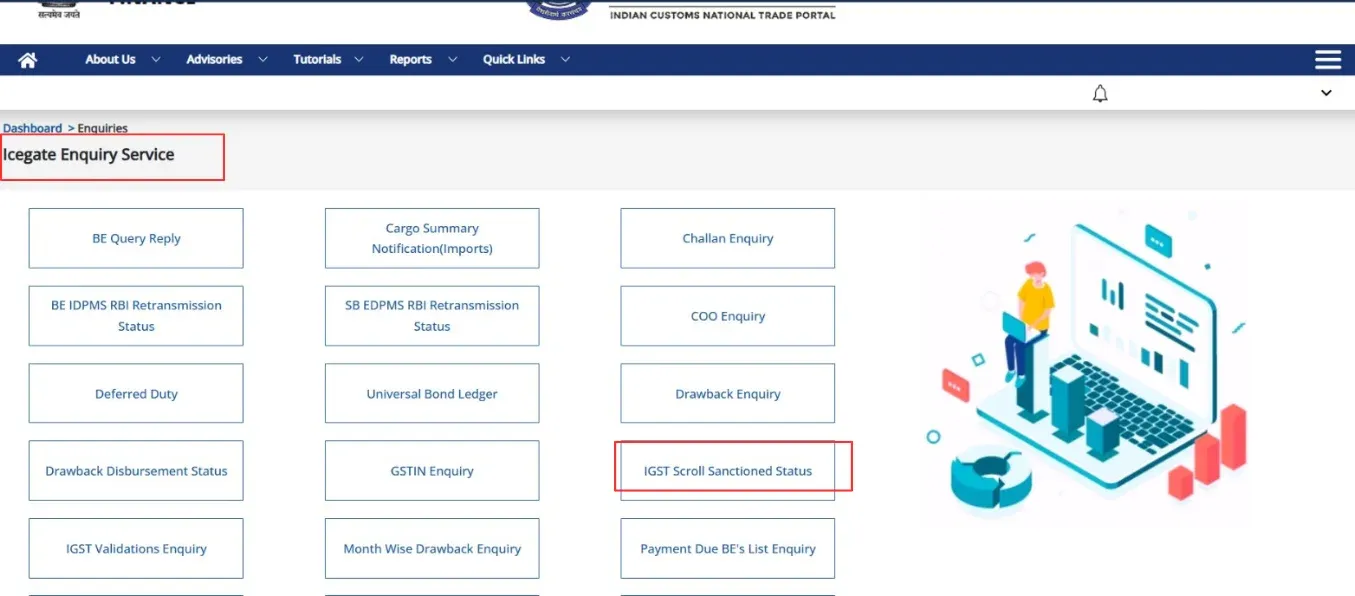
Step 4: Select "IGST Scroll Sanctioned Status"
On the ICEGATE Enquiry Service page, you'll find multiple enquiry options.
Click on "IGST Scroll Sanctioned Status"
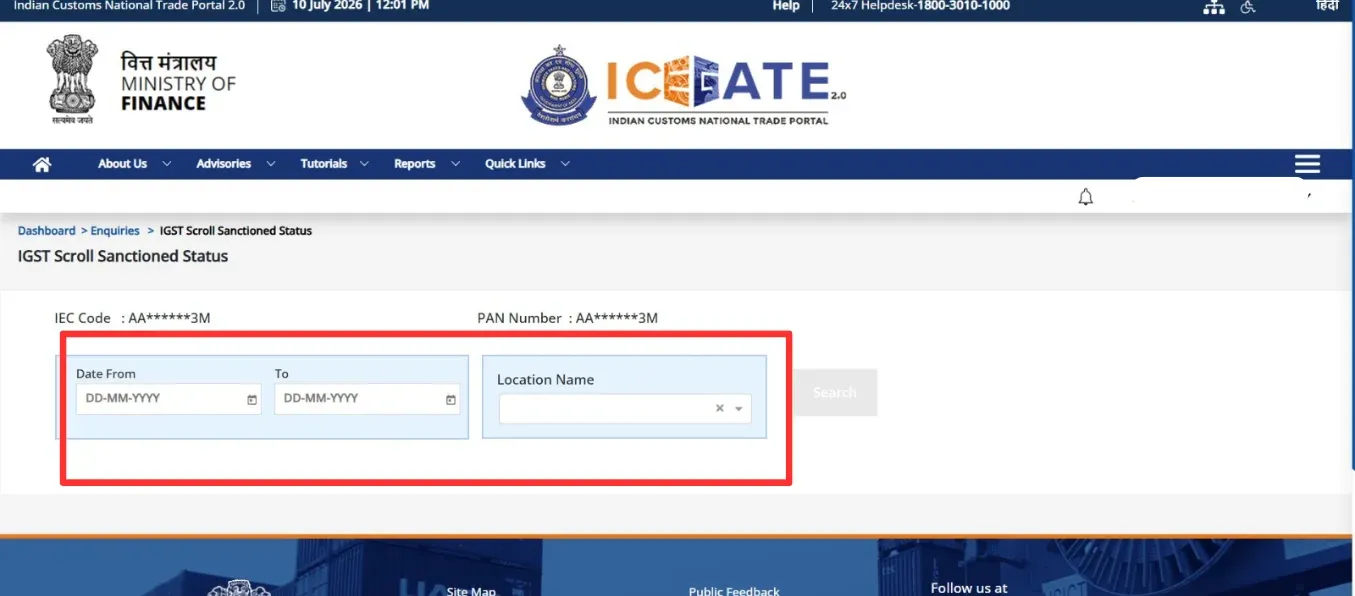
Step 5: Enter Search Details
On the IGST Scroll Sanctioned Status page, provide the following details:
- Date From
- Date To
- Location Name (Port Code)
Your IEC Code and PAN Number will already be displayed based on your login.
After entering the required information, click Search.
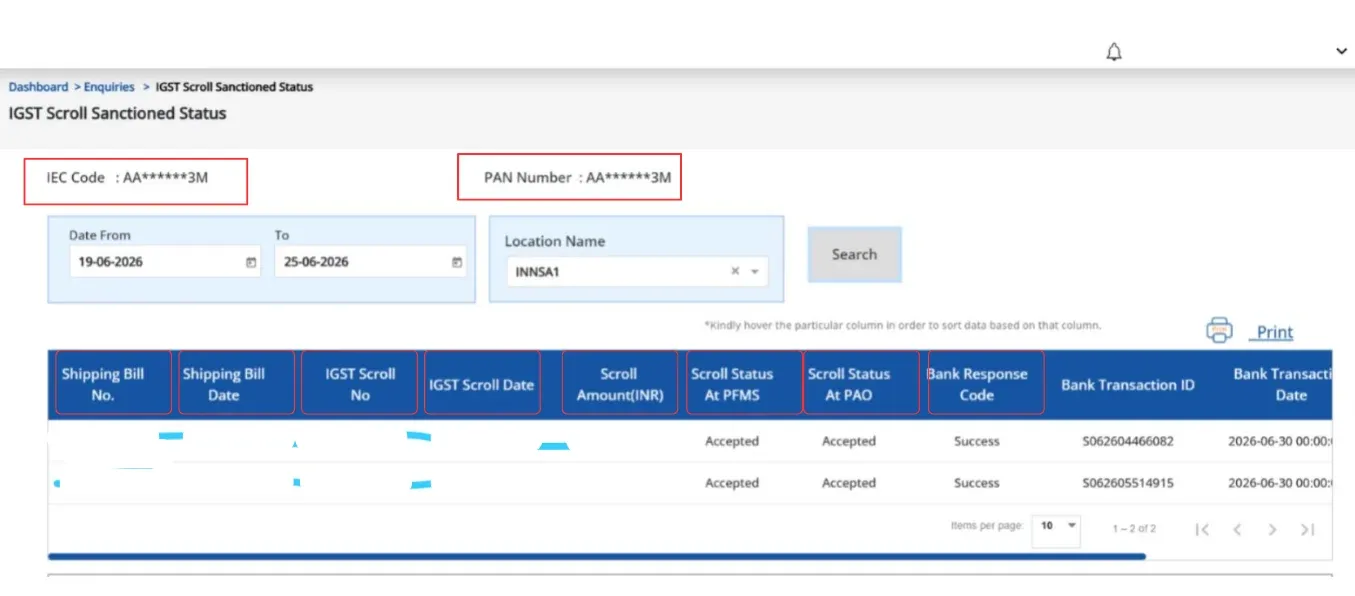
Step 6: View Your IGST Scroll Status
The system will display your IGST Scroll details, including:
- Shipping Bill Number
- Shipping Bill Date
- IGST Scroll Number
- IGST Scroll Date
- Scroll Amount (₹)
- Scroll Status at PFMS
- Scroll Status at PAO
- Bank Response Code
- Bank Transaction ID
- Bank Transaction Date
Steps for IGST Scroll Status on GST Portal
Before Customs generates the IGST refund scroll, export invoice details must be successfully transferred from the GST Portal to ICEGATE.
1. Log in to the GST Portal (https://www.gst.gov.in/)
2. Click on:
Services > Refunds > Check Status of Invoice Data Shared With ICEGATE
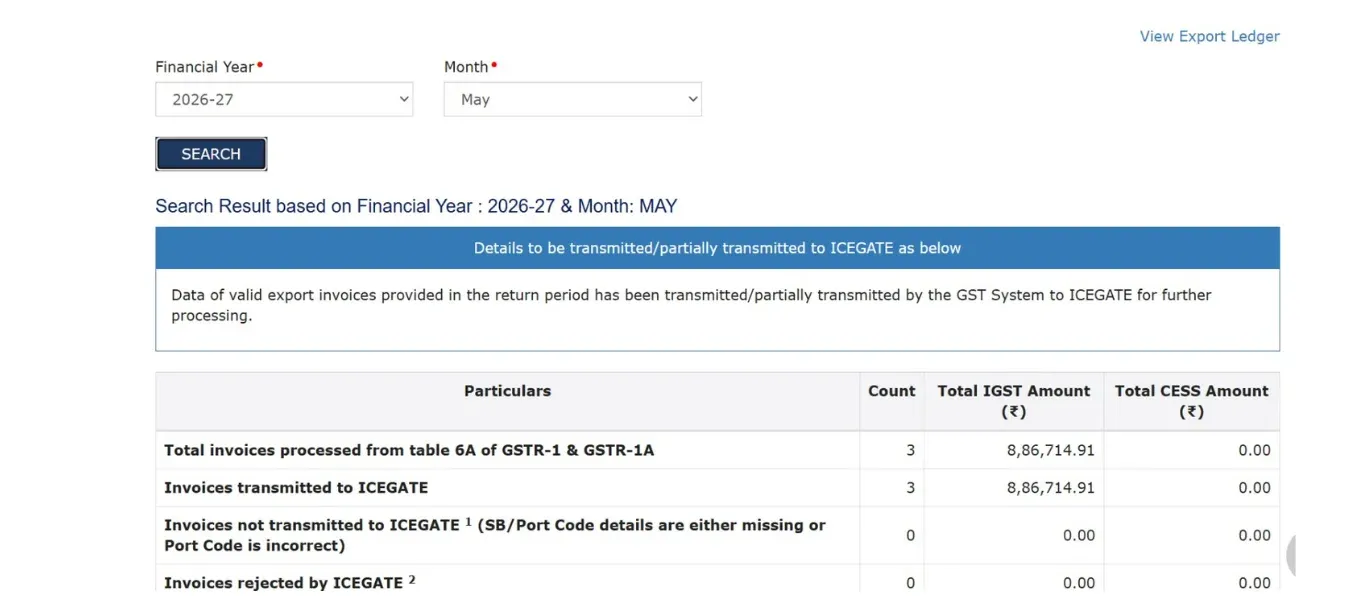
3. Select the relevant financial year and month.
4. Click on Search.
Note: Check the reason why the invoice data has not been transferred to ICEGATE for generating the IGST refund scroll, and resolve the issue causing the data transfer
Failure of the ICEGATE portal.
Documents Required for IGST Refund Scroll Status ICEGATE Check
- Shipping Bill copy with date and port code
- IEC code and GSTIN of the exporter
- Bank account details linked with ICEGATE
- EGM copy for the relevant shipment
Meaning of Different Scroll Statuses
Each scroll status reflects a different stage of processing, and understanding these terms saves time during follow-up.
Common IGST Scroll Status Types
Why Your Scroll Is Not Generated?
Scroll generation failure is one of the most common complaints among exporters checking the IGST refund status.
Common Reasons for the IGST Scroll Not Generated
- Shipping Bill Status shows a pending EGM filing by the shipping line
- Bank account not validated or mismatched with PAN
- GSTR-1 and GSTR-3B invoice value mismatch
- Bill of Entry details not matching export data
- Wrong IFSC or account number registered on ICEGATE
Common Errors and Solutions for IGST Scroll Status Delay
Most scroll delays fall into a few repeated categories, and each has a specific fix.
Errors Exporters Face During Scroll Status Enquiry
- Response shows scroll not generated even after weeks
- IGST scroll number not visible on the portal
- Refund shows sanctioned, but payment status remains pending
- EGM Status not updated by the carrier(SB001)
Experts' Solution to Fix Scroll Delay Issues
- Confirm EGM filing with the shipping line immediately
- Reconcile GSTR-1 and GSTR-3B data before filing refund claims
- Update the correct bank details through the ICEGATE Login
- Raise a grievance ticket citing the IGST scroll number
- Track parallel IGST Refund Status on the GST portal for cross-verification
Many exporters also delay resolution because they check only one portal instead of cross-verifying Shipping Bill Status, EGM Status, and Bill of Entry details
together.
Reviewing all three data points at once usually reveals the exact mismatch causing the holdup.
Conclusion
Tracking IGST Scroll Status on ICEGATE helps exporters identify exactly where their refund is stuck, whether at EGM validation, bank verification, or customs sanction. Understanding scroll status meanings, from pending to sanctioned, saves time during follow-up with authorities.
Regular scroll status enquiry combined with EGM Status and Shipping Bill Status checks prevents long-term refund delays. For exporters struggling with delayed or stuck IGST refunds, MyGSTrefund offers expert assistance to track and resolve scroll status issues faster.
Frequently Asked Questions (FAQS)
1. How Can I Check My IGST Refund Scroll Status?
Log in to ICEGATE and use the IGST scroll status enquiry option with your Shipping Bill details. The result shows if the scroll is pending, sanctioned, or already old.
2. What Are The Reasons For An IGST Refund Scroll Pending Status?
Pending status usually happens due to unfiled EGM, bank mismatch, or unmatched GST return data. Resolving these triggers speeds up scroll generation quickly.
3. Why Is My IGST Refund Scroll Status Delayed?
Delays occur due to Shipping Bill or Bill of Entry mismatches, incorrect bank details, or shipping line delays in filing EGM. Checking each stage helps identify the exact cause.
4. How Long Does It Take For An IGST Refund Scroll To Be Generated?
Typically, scroll generation takes a few weeks once EGM and bank details are validated correctly. Errors in data can extend this timeline significantly.
5. What Should I Do If My IGST Refund Scroll Is Pending?
Verify EGM filing, bank validation, and GST return matching first. If unresolved, raise a grievance on ICEGATE with the shipping bill reference.
6. Can I Track The Payment After The IGST Scroll Is Generated?
Yes, the IGST scroll payment status on ICEGATE shows if the amount has moved from the scroll to your bank account. Cross-check with IGST Refund Status on the GST portal for confirmation.
Related Posts